WhatsApp import
Import your WhatsApp chats with tenants
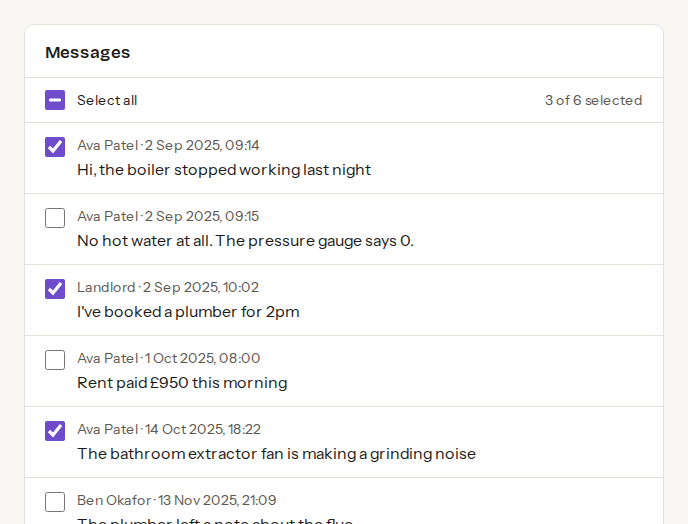
Repairs, notices and rent reminders sit in WhatsApp. Upload the chat and keep the messages that matter as a dated record on the tenancy.
- Each ticked message becomes a dated timeline entry
- Exports from iPhone and Android, as .zip or .txt
- Nothing is added until you tick it
- Tenants never see the chat, and it is deleted when you finish
Start free
WhatsApp import is part of Premium, £15 a month.
How it works
Export the chat
In WhatsApp, open the chat and choose Export chat.
Upload it to the tenancy
A .zip or .txt file, up to 20 MB.
Tick what to keep
Each message joins the timeline with its own date.
Frequently asked questions
- Can my tenant see the chat?
- No. Tenants never see the uploaded chat, and it is deleted when you finish the import. Only the messages you tick are kept, as timeline entries.
- Can it pick out rent and receipts?
- Letbook can suggest repairs, notices, rent and expenses from the chat for you to check. A money entry stays out of your totals until you confirm the amount.
- Which plan includes it?
- Premium, at £15 a month. Free accounts see the import on each tenancy with its price.
Also in Letbook: Spreadsheet import · Expenses logged for you · Claude and ChatGPT